For beginners, selecting the correct laser engraving machine to dive into the detection of laser engraving could lead to a very difficult choice. There is a large variety of machines starting from small desktop models to advanced systems; so, it might look like a very hard task to spot the best engraver that has a perfect combination of user-friendliness, functionality, and price. However, this article will guide you through the process. We will assist you with the crucial factors in choosing the ideal laser engraving machine according to your needs whether you are a hobbyist wishing to give things a personal touch or an entrepreneur ready to start your custom products line. By the end of this article, you will not only be familiar with the essential features and what to search for but also be in a position to make a well-informed decision and do it with confidence.
Understanding Laser Engraving Technology
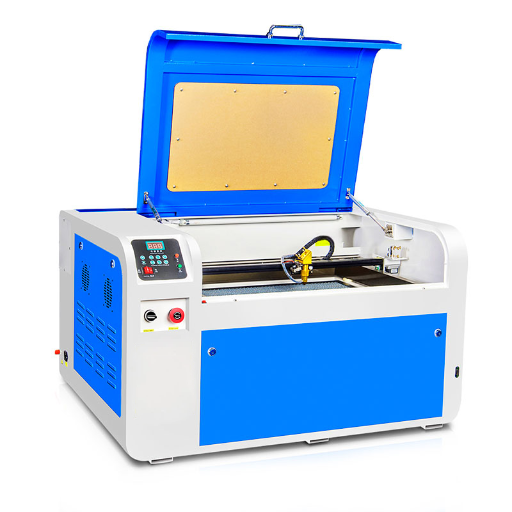
The laser engraving technology employs highly focused light beams for producing accurate and permanent designs or markings on several materials like wood, metal, glass, and plastic. The procedure consists of the laser making the surface of the material disappear or change, which is done without physical tools ensuring the highest level of precision and evenness. Its wide range of application, user-friendliness, and detailed output capability have made it a tool of choice for both individual and business uses.
The Science Behind Laser Engraving
Laser engraving uses the principles of light amplification by stimulated emission of radiation. A laser, which is the acronym for those principles, is a highly focused beam of light that is created first and then aimed at the material surface. Depending on the material and the effect that is to be achieved, the energy of the laser either vaporizes the surface, produces microscopic cracks, or activates chemical changes to penetrate and to make the design deeply and permanently.
Modern laser engraving machines generally come equipped with advanced computer-aided design (CAD) and control technology which very accurately directs the movements of the laser. This allows for very detailed and uniform patterns even on difficult surfaces. Furthermore, lots of machines vary the laser’s power, speed, and frequency in order to attain the best result possible for the engraving on the specific material chosen. This mixture of scientific principles and technology guarantees the precision and flexibility that are the hallmark of laser engraving, making it a preferred choice for both artisans and the industry.
How Laser Engravers Work
Laser engravers are devices that apply concentrated light beams to carve designs on various materials. The whole procedure starts with a drawing which is produced using a special computer software, then the drawing is converted into a language that is readable by the engraving machine. The laser beam, which is moving under the control of motors and mirrors, is precisely applied to the very surface of the material, heating up and thus either vaporizing or eliminating layers to leave behind a mark that is permanent. The sophisticated modern-day methods of laser engraving come with the installation of superb cooling systems to effectively keep the machine from overheating, and they also have real-time monitoring features in place to guarantee precision and productivity. This superb technology can find its way into so many diverse uses; from engraving names on items like rings or necklaces to implementing the laser for industrial purposes like marking serial numbers on machines, thus ensuring that every project is both durable and consistent.
Types of Laser Engravers: CO2, Fiber, and Diode Lasers
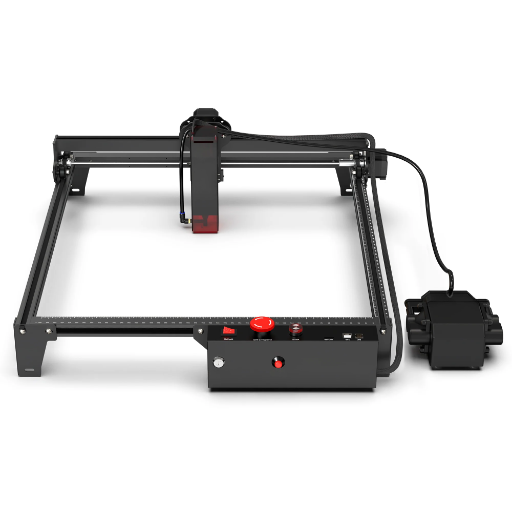
CO2, Fiber, and Diode lasers are the primary types of laser engravers, each offering distinct capabilities suited for various materials and applications.
| Type | Key Feature | Application | Material | Lifespan | Cost |
|---|---|---|---|---|---|
| CO2 | High power | Versatile use | Wood, Acrylic | Long | Moderate |
| Fiber | Precise | Industrial | Metals, Plastics | Long | High |
| Diode | Compact | DIY projects | Soft materials | Medium | Low |
Choosing the Right Laser Engraver
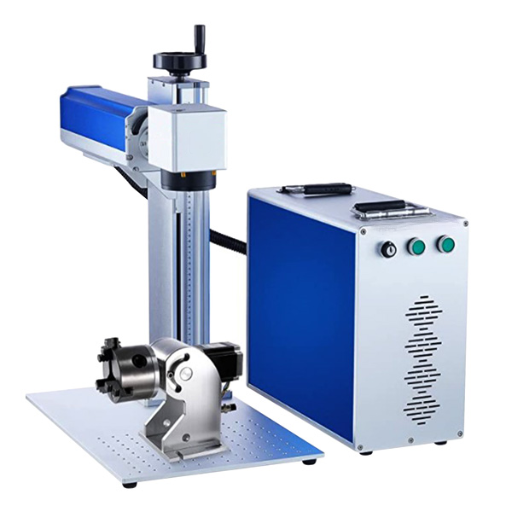
Laser engravers vary in their capabilities, and therefore, it is essential to find the one that perfectly matches your requirements. In case you desire a laser that smoothly goes through different materials and at the same time offers good quality, then CO2 laser is one of the options that you can consider. On the other hand, if you need extremely minute details and high accuracy in cutting metals and plastics, then the fiber laser is the one that you should go for. A diode laser is quite an economical option compared to other lasers, so it would be a good choice for small and soft materials DIY projects. The right selection should be based on an analysis of such factors as material compatibility, project scale, expected lifetime, and price.
Essential Features to Look For
- ★ Power and Speed: Pick a laser engraver with adequate power and speed for your project needs, thus saving time and ensuring the highest quality of work.
- ★ Material Compatibility: Make sure the engraver can work with the materials like wood, metal, acrylic, or others you will be using.
- ★ Engraving Area: Take the size of the working area into account, so it can accommodate the dimensions of your regular projects.
- ★ Ease of Use: Search for software that is easy to handle and controls that are intuitive, particularly if you are a beginner in laser engraving.
- ★ Safety Features: It’s a must that the engraver possesses main safety features such as guard covers, emergency stop switches, and good air circulation.
- ★ Durability and Build Quality: Go for a machine that is made of strong materials as this will guarantee a long life and a steady performance.
- ★ Cost and Maintenance: Take your budget into consideration together with the likelihood of having to do ongoing maintenance or replacing parts. Think of the long-term value as compared to the initial cost.
Comparing Desktop Laser Engravers
In the process of comparing the desktop laser engravers, consider these factors most importantly:
- Laser Power: A higher wattage would not only provide a more accurate and faster engraving but also the choice to cut more difficult materials. Let the power level be determined by your needs.
- Material Compatibility: There are some laser engravers that only work on selected materials like wood, acrylic, or metal. Be sure that the device is approved for your materials.
- Software and Connectivity: Look for user-friendly software that is also compatible with popular file types. Although USB and Wi-Fi are already the most widely used connection methods, having both could be a big help.
- Bed Size: The size of the working area determines what projects you can do. Larger beds mean more sophisticated designs but might also result in higher costs and the need for a bigger machine footprint.
- Ease of Setup and Use: For newcomers, it would be a wise move to pick a laser engraver with user-friendly controls and a simple assembly process so that there will not be a steep learning curve.
If you carefully consider all these factors, you will be able to select a laser engraver that meets your requirements and budget.
Safety Tips for Home Workshops
⚠️ Important Safety Guidelines
- Always Wear Protective Gear: You should start with the protection of your eyes, hands, and body by wearing goggles, gloves, and proper clothing, respectively, in order to be safe from dust and any bad materials.
- Proper Ventilation: Put it another way, use the airflow of the room to your advantage and breathe clean air in your workspace instead of toxic fumes or dust.
- Workspace Organization: Accident prevention caused by falling or tripping will be avoided when you have all your tools and materials in their respective and proper places.
- Tool Usage: The less the risk of accident, the more you will benefit from them if you use the equipment according to the manufacturer’s guidelines.
- Fire Prevention: Have a fire extinguisher close at hand and keep combustibles out of the heat zone of your machinery.
If you implement these suggestions, you will not only have a safer but also a more productive home workshop.
Essential Safety Gear
Safety shoes equipped with proper protection are the most essential part of the laser engraving equipment. This is the minimum safety gear that is required for the laser engraving process:
- Laser Safety Glasses: Never take off the lenses that have been guaranteed for the exact laser wavelength of your machine since they will protect you from the laser hazards.
- Respirator Mask: It will be better to put on a respirator mask that is capable of removing particles or fumes that are harmful and may come off during the engraving process.
- Heat-Resistant Gloves: Be sure to put on gloves that are heat and cut resistant while working with the laser treated materials.
- Fire Extinguisher: Store a fire extinguisher near the working area so that it can be immediately accessed in case of any incidents involving flammable materials.
Every time you use this basic gear, you will not only be safe but also produce top-notch laser engraving results.
Setting Up a Safe Workspace
The foremost benefit of employing a safety feature in a laser engraving workspace is its dual role i.e., safety and productivity. In any case, the entire area to be utilized has to be provided with excellent ventilation as the engraving process will produce vapors and smoke which will otherwise accumulate if not vented out. The laser engraving machine has to be placed on a non-flammable, flat surface, and there must be sufficient distance between it and walls or any other things. The whole operating area should be thoroughly cleaned of all fire sources and polishing agents.
The proper lighting in the workshop will allow you to easily monitor the engraving and the very clear delimitations will make it safer to work with, protecting against unauthorized entrances during the engraving period. Do not hesitate to invest in the use of safety instruments that are considered standard in the industry such as air filtration systems which will greatly reduce the number of airborne particles. Finally, a fire plan should always be prepared which includes a fire extinguisher that is in working order and located nearby so that any incidents can be handled quickly.
Emergency Protocols and Best Practices
The best practices combined with emergency preparedness are the main method to assure the safety and proper management of unexpected incidents while operating laser engraving machines. To start with, it would be good for the operators to organize safety drills at which they will refine their emergency response. The drills will involve, among other things, quickly shutting down the machine if a malfunction occurs. and ensuring access to exits, fire extinguishers, and first aid kits is always unblocked so that a quick response can take place in case of a crisis.
Among the best practices is the regular inspection of the equipment to find and remove possible dangers like electric fires or the breakdown of parts. Maintenance according to the manufacturer’s specifications is very much recommended since it will cut down the chances of accidents occurring as a result of mechanical failure. Operable fume hoods should always be in place as a part of safety measures to minimize the workers’ contact with the hazardous fumes, and the use of personal protective equipment such as safety goggles and gloves should be made standard.
Training everyone who is going to use the machine on both proper operations and also on the characteristics and the common dangers of laser engraving is a must. Through creating and maintaining a safety culture, operators will not only reduce but also eliminate the possibility of creating an unsafe environment. Such a combination of procedures along with technological innovations and data-driven safety insights cannot be anything less than a comprehensive solution for laser engraving safety.
Step-by-Step Guide: Completing Your First Laser Engraving Project

Selecting the Right Materials for Engraving
The correct materials to be chosen for laser engraving, will have a huge impact on the quality of the output. Among other materials, the most commonly used ones are wood, acrylic, glass, leather, and some metals. Wood and acrylic make best material choices for the beginners because they can be easily engraved and have many applications. When you select wood, you should not go for darker-colored types like birch or maple but light-colored first and second for better contrast. Acrylic gives very clean, sharp engravings and is ideal for project involving crafting. Do not work on the materials that may have unknown coatings or chemicals on them as they could produce toxins. Firstly, check your laser engraver compatibility with the material you intend to use and if possible, test a small area to get the best results.
Preparing Your Laser Engraver and Software
The achievement of high-quality results depends greatly on the proper preparation of the laser engraver and its related software. Cleaning the lens and mirrors of the laser, removing any dust or residue, and thus getting rid of possible causes of inaccuracy in the laser’s path should be your first step. After that, the process of aligning and calibrating the laser, according to the manufacturer’s instructions, should be done to guarantee that the engraving or cutting done is very precise.
When you are ready to use your software, be sure to check that it is the correct one for your engraver model and that it can manage the materials you will be using. Most of the time, widely used design software like LightBurn and Adobe Illustrator are so well integrated with laser engravers that you can easily create your own designs. Adjust the settings to your material by changing the speed, power and resolution to get the right parameters for your settings. Always remember to make a test cut or engraving on waste material before proceeding with the full project since this would also help you check if there were any adjustments that could have been made to improve the performance which you did not spot.
Executing the Engraving: Tips for Success
- ✓ Lock Your Material: The material has to be securely affixed on the engraving platform to avoid any shifts that could lead to drawings coming off the intended areas.
- ✓ Inspect Laser Focus: The laser’s focusing point should be accurately set in order to attain high-quality and clear engravings on your material.
- ✓ Engage Airflow: Use your engraver in a place where air circulates freely and mount an exhaust system if possible to get rid of smoke and dust very effectively.
- ✓ Keep an Eye on the Process: Always check the engraving operation closely for any errors or overheating to prevent damage to either the project or the machine.
- ✓ Service Your Equipment: The laser engraver’s lens, mirrors, and other parts should be cleaned often to ensure optimal performance and produce high-quality results.
Applications of Laser Engraving
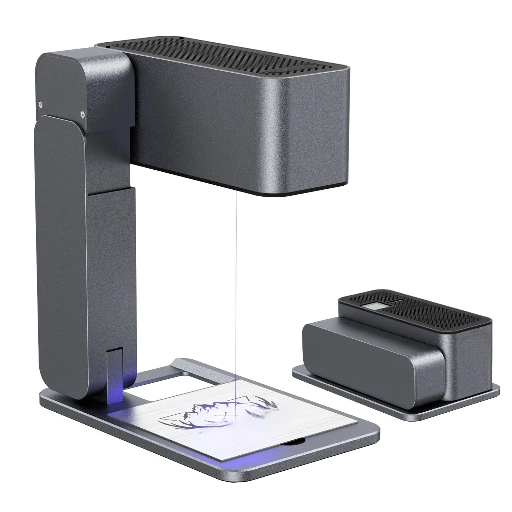
Laser engraving finds numerous applications all over the industries. Personalization of various objects like jewelry, trophies, and gifts is one of the most frequent applications of this technology. In the production sector, marking of serial numbers, barcodes, and logos on finished goods is done through it. Artists and designers turn to laser engraving to apply very fine details to wood, glass, and acrylic. Furthermore, it is involved in the production of high-quality signage, architectural models, and electronic parts, which is a clear presentation of its accuracy and adaptability.
DIY Projects for Hobbyists
Laser engraving is a remarkable method that brings out the creativity of the hobbyists in the most varied and different ways. The topmost of the DIY projects is the making of custom gifts such as personalized keychains, coasters, and wooden signs. Another popular option is glassware or tumbler engraving which can turn out to be a perfect gift or personal use. Decorative ornaments, picture frames, or jewelry are some of the items that hobbyists commonly use laser engravers to produce. In case the safety measures are followed and creativity is applied, then definitely the laser engraving process will still be a fantastic way to bring to life the innovative personalized ideas.
Starting a Small Business with Laser Engraving
Beginning a small business utilizing laser engraving could turn out to be a fun and gratifying journey. As per my study, the very first thing would be to buy a laser engraving machine of good quality that is suitable for both your budget and needs. The next step is to determine your ideal clientele—either custom gifts, corporate branding items, or personalized home décor—and uniqueness and high-quality products would be the main attributes that should be focused on. The very important part of internet presence through one of the e-commerce platforms, or social media is necessary if you want to be reached by customers and also to show your portfolios. Moreover, having the basic knowledge of graphic design software like CorelDRAW or Adobe Illustrator can be very vital when it comes to making complicated and good-looking designs. With a lot of hard work, inventive mind, and good planning, it can be a lucrative business with enormous possibilities through laser engraving.
Creative Ideas for Laser Engraving and Cutting
- Customized Gifts: Create personalized items such as photo frames, keychains, and jewelry with names, dates, or meaningful messages. These are perfect for occasions like birthdays, weddings, and anniversaries.
- Home Décor: Make distinctive and eye-catching wall art, coasters, clocks, and ornaments. Laser engraving gives room for very intricate designs and showcasing of detail.
- Business Products: Provide corporate gifts or office items like engraved pens, notebooks, and plaques with the company’s brand for better recognition.
- Signage: Make custom signs that will be used purposely by businesses, events, or individuals with the use of logos and sharp writing.
- Educational Tools: Create puzzles, models, and aids for teachers that will make learning more interactive and fun for kids in school.
- Holiday Decorations: Create merry ornaments, place cards, or themed décor to fit various festivals.
These are simply great products that can attract different types of customers while at the same time highlighting the flexibility of laser engraving and cutting.
Reference Sources
-
Design and Fabrication of Laser Engraving Machine – A study on the development and applications of laser engraving machines in handcraft and gift industries.
-
Design and Experimental Verification of a Laser Engraving Machine – Research on designing and verifying a laser engraving machine for pattern creation on various materials.
-
Design, Testing and Simulation of Cost Effective Laser Engraving Machine – A paper presenting a cost-effective design and simulation of a laser engraving machine.
-
A Review: Effect of Different Laser Types on Material Engraving Process – A review of how various laser types impact the engraving process and material characteristics.
- Top CNC Laser Marking Machine Manufacturer and Supplier in China
Frequently Asked Questions (FAQs)
❓ What is the laser engraver for beginners going to be like for a rookie?
A laser engraver for beginners, in most cases, gives the user an easy-to-use software and a basic setting in which to get easily started with wood, acrylic, leather, and some coated metals. The novice level laser engraving machines of the desktop type, including diode laser engravers and cheap laser engravers, are best suited for hobbyists and also for people who like to do laser engraving in their spare time. One should expect to learn the rudiments of focusing the laser spot size, selecting power and speed settings, and safety in general—especially if working with a CO2 laser cutter or desktop CO2 laser engraver.
❓ What is the most suitable beginner’s laser engraver or good choice of laser?
For beginner’s laser engraver selection the most suitable one factors like cost, power, and types of materials to be worked with need to be considered first. Diode lasers with power values of 22W or 30W effective power and desktop CO2 lasers are enough for engraving and cutting wood and acrylic. If you mainly deal with metal, then the fiber laser or the mopa fiber laser is the right choice for you. A reliable laser module, safety enclosure, and active air assist are some of the features that the manufacturer offers and that you might want to consider. The market offers overviews of different lasers, and in addition, it is possible to find comparisons of the most popular budget ones to help you choose what is the most cost-effective laser that meets your requirements.
❓ Can a co2 laser cutter or desktop co2 laser engrave and cut wood with quality?
Without a doubt, the CO2 laser cutter—a desktop CO2 laser cutting machine included—is an exceptional selection for a wood cutting and engraving. A standard configuration of a 40W or 55W CO2 laser in a laser cutter provides the required power to cut thicker wood whilst making fine engravings at the same time. The small business and laser engraving business projects related to signage, décor and custom wood gifts are a frequent use of CO2 laser engravers.
❓ How does a diode laser engraver contrast with a fiber laser engraver?
In general, diode laser engravers are inexpensive devices, so they are appropriate for beginners, and their use is mainly limited to wood, leather, and a few plastics. In contrast, fiber laser engravers and MOPA fiber laser systems are typically more expensive but are required in the engraving of metals, anodized aluminum, and the creation of very fine details—such as jewelry engraving or industrial marking. If engraving metals is in your plans or if you want to set up a laser engraving business that covers metal parts then choosing a fiber laser or mopa fiber laser would be a good investment.
❓ How does cutting and engraving get affected by laser spot size and power, e.g., 22W, 30W, 55W CO2?
The laser spot size and power together control the detail and cutting capacity. Finer engraving detail and better precision are obtained from a smaller laser spot size, which is also important for precision laser work and jewelry engraving. Higher wattages such as 30W diode or 55W CO2 mean faster cutting and the ability to cut thicker materials, while 12W–22W low-powered laser engravers are good for engraving and cutting of thin materials only. Thus, it is imperative to match spot size and wattage to your specific projects: if your project is detailed engraving then you should go for small spot size, while cutting of thick wood necessitates usage of more power.