Thanks to the emergence of small, portable laser engravers, laser engraving and cutting have become the most affordable in today’s market. If you are a hobbyist wishing to give a personal touch to your project, a small business proprietor wanting to make your wares more attractive or an artist getting into new mediums, these little gadgets are capable of turning your ideas into physical things.
This guide aims to prepare you with all the necessary insights about portable laser engravers, their functional capabilities and practical applications, as well as the features you should consider when selecting one. By the end of this article, you will gain a perfect comprehension of how these mighty instruments can liberate your imagination and make your projects more efficient, regardless of your expertise level. So, let’s begin!
Introduction to Small Portable Laser Engravers
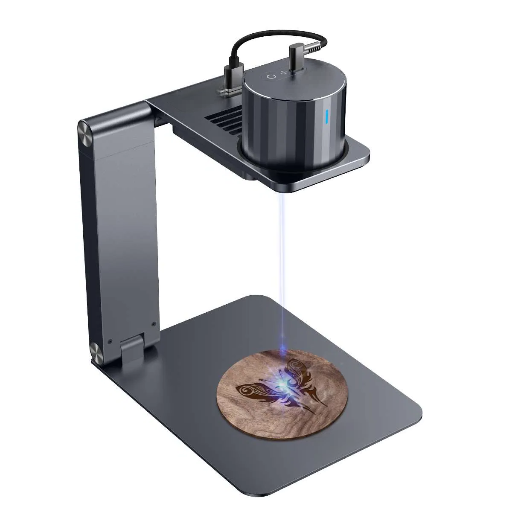
Small portable laser engravers are multi-functional instruments that use laser technology to accurately craft, slice, or label a variety of materials. These small machines are designed for artists, small traders, and professionals who need a powerful engraving tool that is portable and easy to install. They can work with the same range of materials as the prominent engravers: wood, plastic, leather, and a few metals, thus standing out in the sector of both creative and practical uses, from personalized presents to commercial products. Their size, ease of handling, and cost-effectiveness make them a perfect option for anyone looking to try laser engraving without breaking the bank or dealing with a complex installation process.
⚡ What is a Portable Laser Engraver?
A portable laser engraver is a compact and lightweight machine that is perfect for carrying with you and that operates through laser technology to engrave or subtly mark different materials with precision. Such equipment uses concentrated laser beams to burn designs, words, or letters into wood, acrylic, leather, plastic, and some metals. Portable laser engravers are the most preferred because they are user-friendly, versatile, and easy to carry to different locations. Thanks to their low price and expanding uses in small businesses, DIY crafts, and art industry, the demand for portable engravers is increasing. Several models already incorporate cutting-edge features such as wireless connectivity, enhanced safety systems, and app-based product management to make them more accessible and easier to use.
How Do Laser Engravers Work?
A computer-controlled system guides the laser gyroscope to predefined patterns on surfaces, enabling etching, carving, and embossing with high precision. In this process, the laser, guided by an artwork entered via a computer, emits high-energy light that contacts the material surface. The so-furnished high-energy light could vaporize, melt, and even re-colour peculiar parts to assure proper design control. Laser work is performed using a range of lasers commonly used in machining, including fiber lasers, carbon dioxide (CO2) lasers, and small diode lasers. Each will work well with a range of materials, including wood, metal, plastic, leather, and glass.
There are three stages that enable the engraving process: a laser source to generate the beam, optics and mirrors to guide it, and a lens to focus it onto the material. The laser’s accuracy enables intricate designs, while software controls depth, speed, and patterns to produce precise, consistent results. Additionally, recent advances in AI integration and cloud-based design uploads have made laser engraving more efficient and accessible to users across all levels of experience.
Why Are Portable Laser Engravers Gaining Popularity?
Portable laser engravers are making a real name for themselves, capable of engraving wood, metal, glass, leather, and more. These enhance your creativity in whatever sector you plan to use them, whether for corporate gifts, small-business trademarks, or an enthusiastic DIY project. These devices are designed to be height- and portable, enabling secure transport to locations such as home workshops, daily workplaces, and more. Providing all portable engraver models with user-friendly software, Bluetooth, and cloud-based design compatibility brings even greater ease of use, moving the devices toward a “Laser remote-control engravers next version.” Cost is another reason why they appeal primarily to those on limited budgets, be it hobbyists or small business owners going for value alternatives to the expensive engraved.
Key Features of Small Portable Laser Engravers
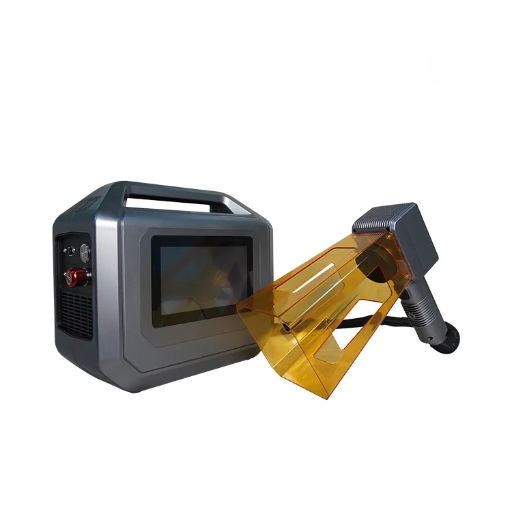
📦 Compact Yet Lightweight Design
One of the most significant advantages of portable laser engravers is their compact size and ease of transport, making them a strong choice for locations ranging from home workshops to professional studios.
👍 Very Simple to Operate
Most models come with simple software and controls, with intuitive settings that let a new user push a button and start engraving.
📡 Advanced Connectivity Options
These engravers support Bluetooth and Wi-Fi, allowing them to connect with a tablet, smartphone, or computers for cloud-based designs and remote operation.
🎯 Broad Spectrum of Materials
They can be engraved on several surfaces, from wood and leather to silicon and metal, demonstrating their broad potential applications.
💰 Economical and Save Costs
Portable laser engravers are low in costs for an average buyer, as they offer work performance for considerably less money in comparison to the expensive computer-controlled models.
⚡ Accurate Engraving with High-Speed
Also, the engravers are small and unique, yet they still produce accurate, beautiful results quickly, with professional-quality results.
Laser Technology: Diode vs. Other Types
Laser technology can be categorized into diode, CO2, fiber, and solid-state types. Below is a concise comparison of these technologies:
| Type | Wavelength | Cost | Power | Speed | Material |
|---|---|---|---|---|---|
| Diode | Visible/NIR | Low | Low-Mid | Moderate | Soft/Metal |
| CO2 | Infrared | Mid-High | High | Moderate | Organic |
| Fiber | NIR | High | High | Fast | Metals |
| Solid-State | NIR/UV | High | High | Fast | Specialized |
This table outlines key differences in wavelength, cost, power, speed, and material compatibility, helping users select the most suitable laser type for their specific requirements.
Engraving Area and Speed Considerations
Opera-tional speed and size of the engraving area are vital considerations before choosing a laser for engraving. An extended area will facilitate headlong multiple items and larger projects, thus increasing productivity in an industrial environment. Compact lasers with relatively small engraving areas are most frequently used by individuals or for small production/hobby output.
Speed is a key factor in cases where operations are large-scale. For example, fiber lasers are significantly faster in their engraving speed compared to their competition and much desired for marking of metals, especially high-volume production. Diode lasers are slightly slower; however, they are very cost-effective for projects that do not require fast turnaround, such as detailed artwork or a hobby. CO2 lasers optimize machines to work swiftly with material compatibility across a wide range of organic materials, including wood, leather, paper and cardstock, and acrylic. The choice of the ideal laser ultimately depends on the user, depending on whether they aim to engrave large volumes or achieve the highest production speed. Advances in laser technology have made it possible to develop a tailored system that balances area, speed, and material compatibility to ensure productivity.
Handheld vs. Desktop Laser Engravers
| Parameter | Handheld | Desktop |
|---|---|---|
| Portability | High | Low |
| Size | Compact | Larger |
| Power | Moderate | High |
| Precision | Medium | High |
| Versatility | Limited | Broad |
| Price | Lower | Higher |
Applications of Portable Laser Engravers
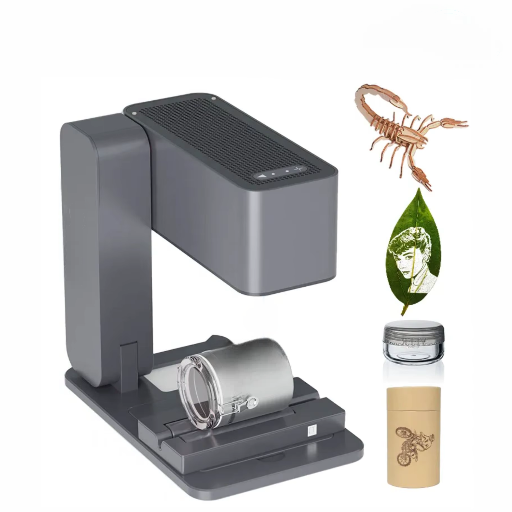
Small Lot Production
Good for the making of parts for prototype devices and bespoke products.
Repairs
Post-producing activities like engraving or marking items directly on the spot or in remote locations.
Engraving
Laser engraving, scribing, or other marking applications with precision.
Signage
Produces decorative outdoor or indoor signage with professional quality.
DIY Projects and Creative Use Cases
What laser engraving machines do complements any workshop of individual vendors or crafters. They can personalize everyday décor items such as wooden signs or coasters, backed by an undeniable gift option: laser-engraved jewelry, photo frames, or keychains that add a personal touch. Their input on creative work is phenomenal, enabling detailed designs in materials ranging from leather and glass to acrylic, marble, and ceramics. With a little interest and inspiration, your laser engravers can produce objects that wow in most respects.
Engraving Materials: Acrylic, Wood, and Stainless Steel
The aforementioned materials are preferred for the wide range of options available for laser cutting and engraving. Think of acrylic, wood, and stainless steel when we refer to the select items at the top of the list. Acrylic, with its silky finish achieved directly, is suitable for creating a smooth surface, making it ideal for LED signs, awards, and decorative panels. Wood is at the bottom of this list because it simply contributes to the natural look. Here, textures are discussed in relation to an engraving, as the wood is thick and suitable for signs, furniture, or souvenirs. And finally, his respect has far and widely been recognized in the industrial and professional categories, stainless steel is a supplier of people used to be working on engraved tools such as urns, plaques, medical practices, etc.
While acrylic engravings are considered durable for indoor environments, wood-based engravings may fade or wear over time when exposed to harsh weather. On the other hand, stainless steel engravings are characterized by unmatched strength and wear resistance, with a fiber laser’s precision assembly, making them useful in many situations, especially for outdoor activities. This broad application criterion makes laser engraving one of the most versatile interactive solutions for a wide range of creations across industries.
Laser Cutting Versus Engraving
Portable laser engravers make for excellent tools for both laser cutting and engraving and provide great versatility in the practice of different applications. Engraving is primarily used to customize objects, create fine art, and engrave materials such as metal, wood, leather, and glass. This function is widely practiced across jewelry, home decoration areas, and product branding.
Conversely, laser cutting with portable engravers primarily offers precision and is used to cut materials such as wood, acrylic, and thin metals to create intricate designs or structural components. It is used in prototyping, hobby crafts, and small-scale production. While engraving adds a concrete finish to a work of art and makes it personal, the cutting aspect shapes and removes material. Portable laser engravers offer greater capability by integrating the two functions in a single, pocket-sized contraption.
Essential Features to Consider When Choosing a Laser Engraver
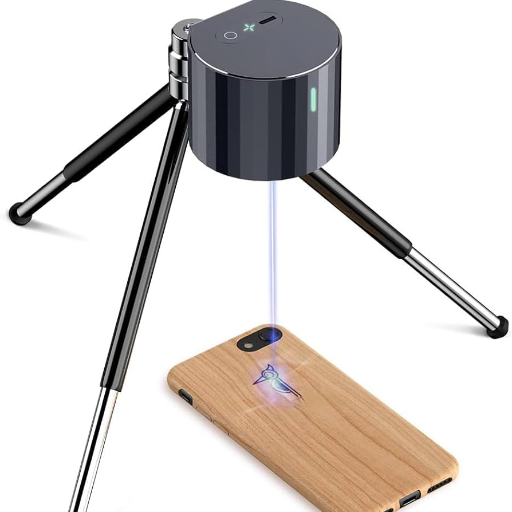
When you buy a laser engraver, the following features are considered majorly:
- 🔋 Strength of the laser: It will affect the range you can go in the thickness of cuts or engravings of different materials.
- 📐 Size of working field: Make sure that the machine you choose has enough size to suit the object to be worked on.
- 🎯 Material quality: The machine must be appropriate with the material that is supposed to go under the engraving process.
- 💻 Software Compatibility: Compatible software should have an easy-to-use interface, along with accommodating the more commonly used file formats.
- ⚡ Accuracy vs speed: Higher-resolution settings and engraving options speed up work.
- 🏗️ Strength & Durability: Make certain of acquiring a powerful laser engraving machine with the highest quality.
- 🛡️ Safety: More safety features are close patterns, extraction systems to clean the fumes, and a quick stop button.
- 🎒 Portability: Compact designs are great for usage in various settings.
Power Output and Engraving Speed
Power output and engraving speed are two key factors that determine the efficiency and precision of a laser engraver. Higher power enables the machine to cut tougher materials and engrave with greater intensity. Meanwhile, the lower-power laser is best suited for detailed, defined engraving. The rate at which a job is done — engraving speed — determines productivity. A good balance between power and speed delivers the best results across all known applications: the machine should have sufficient power for the material being engraved while maintaining enough speed to maintain acceptable resolution without sacrificing detail. Compare your material and design requirements precisely to select the optimal combination.
Material Compatibility: Acrylic, Ceramics, and More
Laser engraving technology has enabled the processing of a wide range of materials, making it a highly flexible tool for multiple applications. Acrylic thus maintains great popularity because of the capacity to render sharp and embodied texts or designs with clean borders. Typical uses include signage, writing, and artwork. A key challenge for ceramics is that they must be handled with care, as their dense structure and brittleness require precise laser application to prevent cracks from forming. In addition to these, laser engraving can be used on materials such as glass, wood, metal, leather, and certain plastics. Each material has a unique setting that requires attention; therefore, understanding your laser’s chilling power and setting the parameters are essential to achieve the desired result. When creating exquisite artwork, custom-made gifts, or a professional-grade product, it is wise to choose appropriate materials to ensure the final output meets all your criteria.
Portability and Ease of Use
Portability and user-friendliness both play a key role in the selection of the best laser engraving machine for small users, hobbyists, and professionals working with them. The benefit of portability is that compact, lightweight models can be moved easily to a site where the user is faced with an on-site project or space constraints. With touchscreens, many machines with functional interfaces are blissfully simple, reducing the daunting learning curve that would keep a neophyte toast there forever before he would have the chance to engrave. The demand for wireless engraving and machines having the ease of interfacing different operating systems is on the rise, pointing to an overall desire to prefer an accessible and mobile option. Buying a user-friendly machine is a step toward ensuring efficiency and a pocket brimming with creative potential across a multitude of settings.
Tips for Getting Started with Laser Engraving
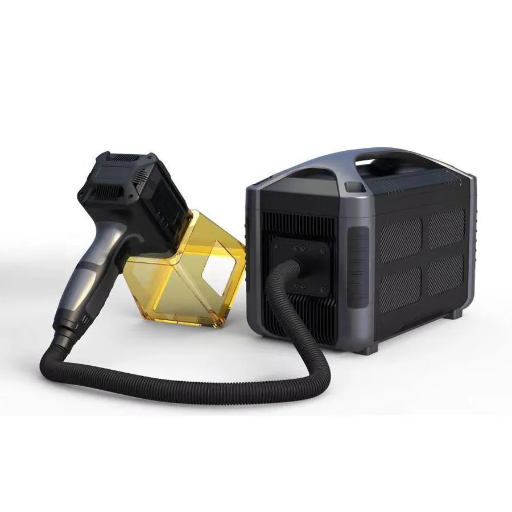
Simplicity in Starting
Start on your laser engraving with the simplest projects which may help you recognize the quirks and nuances of the design and operation parameters of the machine.
A Relevant Material
Choose a material suitable for laser engraving, which should be wood, acrylic, leather, glass, or any material that goes with laser engraving, and check if it is ideal for your particular machine.
Experiment on Scrap Material First
Before starting the engraving of your final piece, test all the settings, speed, and power, and focus on some smaller scraps of the same material until you find the correct settings to achieve the planned effect.
Clean the Workstation
Clean your machine and workstation after each project to prevent dust, debris, and environmental residue from accumulating. This goes a long way toward promoting efficient success in many other projects.
Get Understanding Through Training
Binge-watch tutorials from the net, read user documentation, and share best-practices in online forums to lean on your skills and to knowledgeably and expertly improve your laser-engraving prowess.
Beginner-Friendly Tips and Tricks
Initiate with Basic Designs – Open with plain and straightforward designs so you can develop some confidence and begin working to create your own image during the laser engraving venture. As you become more experience, you can bring yourself to deal with complex patterns. Work with Test Material – Practice on inexpensive materials first to see the reactions they will exhibit in response to the laser. While Doing Plenty of Experimentation with the Results for Laser Settings, Do an analysis of the laser power, speed, and frequency settings to get the best possible for the material being used at that time. Stay Focused on Correct Alignment – Always use guidelines, grids, or rulers to align your material accurately in the engraving bed for a professional, consistent output. Jot Down Project Notes – It is essential to keep records of the materials used and the specific settings applied to each project, to save time and ensure continuity of the same work process in the future.
Common Mistakes to Avoid
- ❌ Focusing the beam incorrectly: Failure to adjust the focus settings will result in inconsistent engraving or cutting.
- ❌ Material settings not appropriate: Material settings like power, speed, and frequency that are off will damage the material.
- ❌ Overriding maintenance: Failure to adhere to basic laser lens or mirrors cleaning procedures can lead to an inefficient machine.
- ❌ Faulty material placement: When materials are misaligned, likely cuts are uneven or the engravings misalign.
- ❌ Disregarding safety measures: Choosing the proper attire or ensuring proper airflow can threaten life and safety.
Maintenance Tips for Your Laser Engraver
- 🧼 Clean the Lens and Mirrors frequently.
A lens or mirror could collect dust and produce an engraved tamper. To maintain operational well-being, use a suitable solution and a lint-free cloth to clean at regular intervals. - 🎯 Check the Alignment of the Laser Beam
Any deviation in the alignment of the laser beam and the working surfaces can impair the precision and efficiency of the work. One should regularly perform checks on the position of the beam. - 🛢️ Proper Lubrication of Moving Parts
With moving components such as rails or bearings, under-lubrication can lead to accelerated wear. Apply oils recommended by the manufacturer. - 🔄 Examine, Replace Exhaust Filters On Occasion
For a better engraving experience, it will be worthwhile to check the filters and replace them when necessary for improving ventilation. - ❄️ Observe and Maintain Cooling System Parts
Ensure the cooling systems are functioning properly, such as water- or air-based systems, to prevent overheating of the laser tubes. -
Frequently Asked Questions (FAQs)
What are laser pecker or mini laser engravers, and how do they compare with diode laser engraving machines?
LaserPecker and other mini laser engravers are simple diode laser systems purposely created for light engraving applications on materials such as wood, leather, paper, and some metals such as coated aluminum. Compared to primary diode laser engraving machines or fiber laser engravers, smaller units (including blue diode lasers or IR variants) offer lower power and greater portability, with a more straightforward setup, but less cutting power and slower engraving. For heavier handwork or metal marking, consider 10W diode lasers, fiber laser engravers, or galvo systems.
Can a handheld laser engraver or portable laser engraver be used to engrave cylindrical jewelry?
Yes-a handheld laser engraver and portable handheld laser devices can mark cylindrical objects and engraved jewelry; the maximum level of success, however, is dependent on the feature set and accessories. Rotary engraving accessories or specialized cylindrical fixtures are usually needed, although, for engraving ring surfaces, cups, or tubes. Precision engraving as low as 0.01 millimeters usually is possible using high-end machinery that provides fine control or a galvo module: as a fat-finger actuator induces error, desktop mini laser engravers will for home decor and DIY laser engraver projects do a decent job in engraving, but not up to the degree of precision pitching of industrial fiber or mopa systems.
How crucial is engraving accuracy, control of the laser, and work area to consider while choosing a small or nano laser engraver?
Critical engraving accuracy and the control laser must be considered. You must check the engraving accuracy and repeatability (both in millimeters), the stability of the laser module control, and the work area for your projects. The bigger work area find some bigger pieces to fit into the engraving area, while a more compact work area helps improve portability. Consider based on your needs for precision engraving for small mechanical parts and detailed accessories: machines with fine step resolution, good thermal stability, and reliable motion control (all of which are included in the high stationery galvo system and the other high caliper models, including Ortur Laser Master).
What are the typical safety needs and concerns, plus your ventilation needs for the mini laser engraver, dual laser, or IR laser unit?
Safety is paramount: wear proper eye protection for diode and IR laser wavelengths, operate machinery in well-ventilated spaces or use fume extraction when burning organic materials, and avoid flammable materials. Dual-laser and higher-wattage units (10W laser or 2W IR laser) generate more smoke and therefore require stronger extraction. Make sure you install the protective enclosure, interlocks, and extraction in accordance with the manufacturer recommendations, in order to contain pollution better and prohibit potential fire hazards.
What are the differences in speed and power performance when considering different options of engravers and cutters, ranging from mini lasers to galvo lasers to 10W lasers?
There are differences in speed and power: Mini lasers are slower and suitable for small-scale and hobbyist projects. 10W Lasers and blue diode lasers provide increased power and faster cutting for thicker wood or acrylic. The fastest marking speeds are achieved when galvo lasers or galvo-driven systems are used, enabling quick marking and precise etching for maximum throughput. To get maximum engraving speed and quick engraving speeds, these would include galvo or fault diode/fiber. This depends on the material and throughput needed.
📚 Reference Sources
-
Design and Fabrication of Portable Laser Cutting and Engraving Machine
- A research paper discussing the development and practical implementation of a low-cost, small laser engraving machine.
-
Design and Fabrication of Portable Laser Engraving/Cutting Machine
- A study focusing on the design and fabrication of a compact, affordable portable laser engraver with automated features.
-
Design and Fabrication of Portable CNC Laser Engraving Machine
- Research highlighting the feasibility and efficiency of low-cost, portable laser engraving machines.
-
- A comprehensive guide on laser cutting and engraving techniques, including raster and vector methods.
- Top CNC Laser Marking Machine Manufacturer and Supplier in China
Ready to Start Your Laser Engraving Journey?
With the right portable laser engraver and proper knowledge, you can transform your creative ideas into tangible reality. Whether you’re a hobbyist, entrepreneur, or professional, these versatile tools offer endless possibilities for customization, prototyping, and production.